PayLinker Review: Online Payment Features, Pricing, and Integration Options
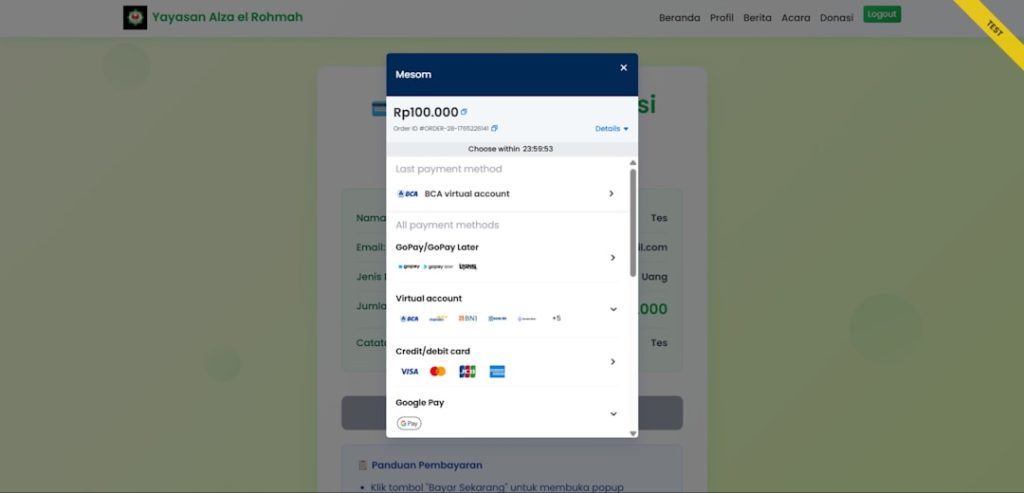
PayLinker is positioned as an online payment solution for businesses that need a practical way to accept digital payments, share payment links, and connect transactions with their existing sales or service workflows. This review looks at its online payment features, pricing considerations, and integration options from the perspective of merchants, service providers, and growing online businesses that need reliability more than novelty.
TLDR: PayLinker is best suited for businesses that want fast payment collection through links, invoices, checkout pages, and API-based integrations. A small consulting firm, for example, could send 120 invoice payment links per month and reduce manual bank transfer follow-ups by 30% to 40% if customers pay directly from the link. Its value depends heavily on transaction fees, supported payment methods, and how well it integrates with your accounting, CRM, or ecommerce stack. Before committing, businesses should compare PayLinker’s total processing cost against expected monthly volume.
What PayLinker Is Designed to Do
At its core, PayLinker focuses on making online payments easier to initiate and track. Instead of requiring every business to build a full ecommerce checkout from scratch, it provides tools for creating payment links, collecting card or digital wallet payments, managing customer transactions, and monitoring payment status from a central dashboard.
This approach is especially useful for businesses that sell services, send invoices, take bookings, or need to request payment after a customer conversation. In these cases, a simple payment link can be more efficient than directing customers through a full online store.
Key Online Payment Features
PayLinker’s feature set is typically most attractive to businesses that need flexibility. Rather than serving only traditional ecommerce websites, it can support several payment collection methods.
- Payment links: Businesses can create a unique payment link for a product, service, invoice, or custom amount. These links can be sent by email, messaging apps, SMS, or embedded in customer communications.
- Hosted checkout pages: A hosted checkout can reduce technical overhead because PayLinker handles the payment form and transaction flow. This may also help businesses avoid storing sensitive payment data directly.
- Invoice payments: Companies that issue invoices can use payment links to speed up collection and reduce the need for manual reconciliation.
- Recurring payments: If supported in your plan or region, recurring billing can be useful for subscriptions, retainers, memberships, or installment plans.
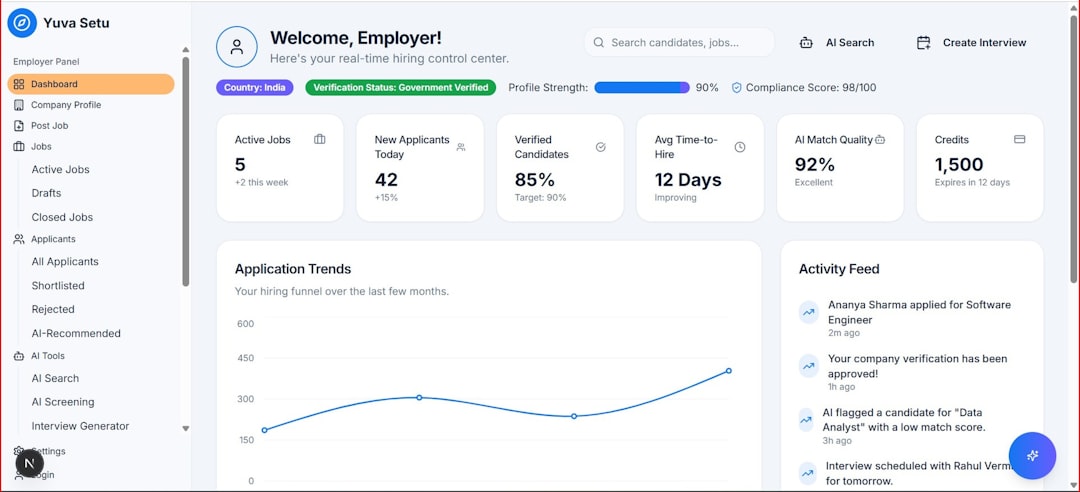
- Transaction dashboard: A central dashboard helps teams view paid, pending, failed, and refunded transactions.
- Customer notifications: Automated receipts and status updates can improve the customer experience and reduce support questions.
For many businesses, the most important benefit is not just accepting payments, but making payment follow-up more structured. A clear dashboard can help staff identify unpaid invoices faster, while automated payment confirmations reduce administrative work.
Security and Compliance Considerations
Any payment platform should be evaluated first on security. Businesses should confirm whether PayLinker uses recognized payment security standards, encryption, secure hosted checkout pages, and appropriate fraud monitoring. If the platform handles card payments, merchants should also understand how PCI DSS responsibilities are divided between PayLinker, the business, and any connected payment processors.
A serious review of PayLinker should also include questions about account verification, chargeback handling, data retention, and user permissions. For example, a company with multiple staff members may need role-based access so that finance employees can issue refunds while sales staff can only create payment links.
Recommendation: before going live, run a small internal payment test, review receipt formatting, confirm refund procedures, and check how failed payments are displayed in the dashboard.
Pricing: What to Examine Before Signing Up
PayLinker pricing may vary depending on country, currency, processor, business type, and transaction volume. For that reason, businesses should avoid evaluating it only by the headline monthly fee. The real cost is usually a combination of platform fees, payment processing fees, refund fees, chargeback fees, currency conversion costs, and possible fees for advanced features.
When reviewing PayLinker’s pricing, focus on the following areas:
- Monthly subscription: Some plans may charge a fixed monthly fee for access to the dashboard, integrations, or higher usage limits.
- Transaction percentage: A common model is a percentage fee per successful transaction, sometimes combined with a fixed fee.
- Payment method differences: Card payments, bank transfers, wallets, and international payments may have different costs.
- Settlement timing: Faster payouts may cost more, while standard settlement may be cheaper.
- Refund and chargeback costs: Businesses with higher dispute risk should examine these carefully.
- Integration or API access: Advanced integrations may be limited to higher-tier plans.
For example, if a business processes 500 transactions per month with an average order value of $60, it handles $30,000 in monthly payments. A difference of only 0.4% in processing cost equals $120 per month, or $1,440 per year. That makes fee comparison important even for moderately sized businesses.
Integration Options
PayLinker’s integration value depends on how easily it fits into the systems a company already uses. For smaller teams, the ability to create and send payment links manually may be enough. Larger teams often need deeper automation through APIs, webhooks, ecommerce plugins, or workflow tools.

Common integration options to look for include:
- API access: Developers can create payment links, retrieve transaction status, automate checkout flows, and connect the payment process with internal systems.
- Webhooks: Webhooks notify your system when events occur, such as successful payments, failed payments, refunds, or chargebacks.
- Website embedding: Businesses may embed payment buttons or link-based checkout options into landing pages and service pages.
- Ecommerce connections: If PayLinker supports ecommerce platforms, it can help synchronize order status and payment confirmation.
- Accounting and CRM workflows: Payment data can be useful for invoice reconciliation, customer records, and revenue reporting.
From a technical standpoint, webhooks are particularly important. Without them, teams may need to check payment status manually. With them, a paid invoice can automatically update a CRM record, trigger a fulfillment task, or notify the finance team.
User Experience for Merchants and Customers
For merchants, PayLinker should be judged by how quickly a team can create a payment request, send it, track it, and resolve exceptions. A clean dashboard, searchable transactions, exportable reports, and clear payment statuses are practical necessities rather than optional extras.
For customers, the payment experience should be simple and trustworthy. The checkout page should clearly show the business name, amount, currency, description, available payment methods, and receipt process. If customers are redirected through confusing pages or see unclear branding, conversion rates may suffer.
A good payment link experience should require as few steps as possible: open the link, review the amount, choose a payment method, confirm payment, and receive proof of payment.
Best Use Cases
PayLinker may be a strong fit for:
- Freelancers and consultants who need to collect one-off payments without building a full checkout system.
- Agencies and service businesses that send invoices and want faster payment collection.
- Training providers and event organizers that need payment links for registrations or deposits.
- Small ecommerce sellers that want lightweight checkout options for custom orders.
- B2B companies that need payment tracking tied to quotes, invoices, or CRM records.
However, businesses with very high transaction volume, complex marketplace payouts, specialized fraud requirements, or strict enterprise procurement needs should examine whether PayLinker offers enough customization and reporting depth.
Potential Limitations
No payment platform is perfect for every business. PayLinker’s suitability may be limited by regional availability, supported currencies, settlement times, available integrations, and customer support responsiveness. Businesses should also confirm whether the platform supports the exact payment methods their customers prefer.
If most of your customers pay by local bank transfer, but PayLinker is strongest in card payments, adoption may be lower than expected. Similarly, if your accounting team needs detailed tax reporting or automated reconciliation, basic transaction exports may not be sufficient.

Final Verdict
PayLinker appears most valuable as a practical payment collection tool for businesses that want to reduce friction, send professional payment requests, and track transactions more efficiently. Its strongest appeal is likely in payment links, hosted checkout, invoicing support, and integration potential through APIs or webhooks.
The main decision factor is cost versus operational benefit. If PayLinker helps a business collect payments faster, reduce manual follow-up, and improve transaction visibility, the platform may justify its fees. Still, companies should review the latest pricing, test the checkout experience, confirm integration requirements, and compare total annual costs before adopting it as a primary payment solution.
Bottom line: PayLinker is worth considering for service-based businesses, small online sellers, and teams that need flexible payment links with professional tracking. It is not enough to ask whether it can accept payments; the better question is whether it can make your payment workflow faster, clearer, and more reliable.